0signer — Bulk DSC Signing for Windows
A Windows desktop tool that watches a folder and signs your PDFs automatically with a Digital Signature Certificate — built for hardware USB tokens, so signing actually works instead of hanging on a hidden PIN prompt.
What's Included
Bulk Auto-Signing
Drop PDFs into a watched folder and 0signer signs them automatically with your DSC — no manual upload per file.
Multiple Signing Profiles
Run several DSCs and input/output folder pairs side by side — one for each department or signatory.
Hardware DSC Token Support
Works with hardware USB tokens (HyperPKI HYP2003 / Feitian ePass2003) via silent PKCS#11 signing — no repeated PIN prompts.
Visible Signature Placement
Align and style exactly where the visible signature stamp appears on each page.
Merge & Split PDFs
Built-in tools to merge multiple PDFs together or split one apart, right from the tray app.
Signing Reports
Review signing activity and status from the tray, plus a log file for troubleshooting.
Inside the App
0signer runs from the Windows system tray — right-click for status and controls, or open Profiles to manage signing folders. (UI mock-ups shown here reflect the real tray app's layout and functionality.)
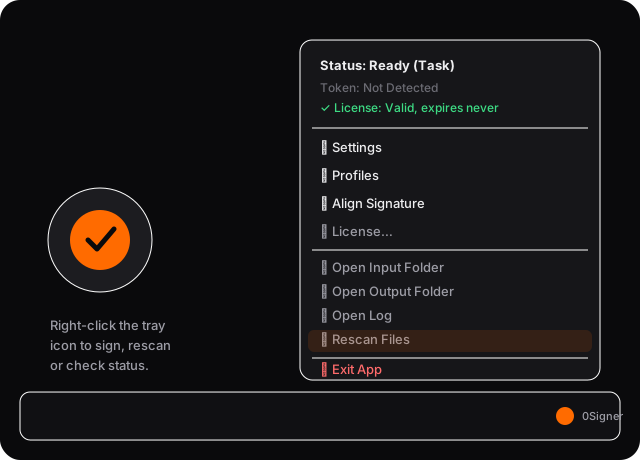
Right-click the tray icon for live status, license info, and quick actions like Rescan Files.
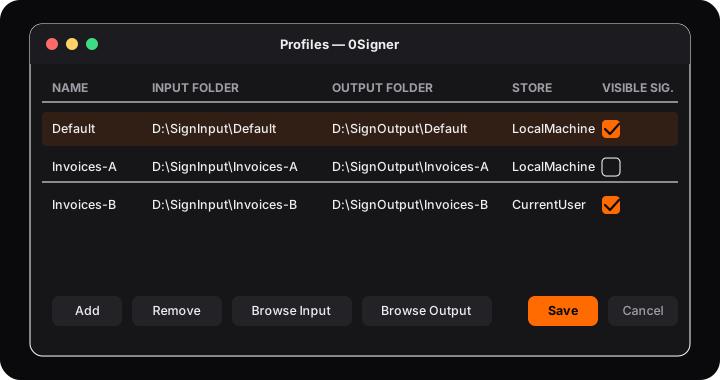
Manage multiple signing profiles — each with its own input/output folder pair and certificate.
Frequently Asked Questions
What is a DSC bulk signer?
A DSC bulk signer applies a Digital Signature Certificate to many documents automatically instead of signing each one by hand. 0signer watches a folder — drop PDFs in, and it signs them with your DSC and writes the signed copy to an output folder.
Does 0signer work with hardware USB DSC tokens?
Yes — 0signer is built specifically for hardware tokens like the HyperPKI HYP2003 (a Feitian ePass2003 rebrand), using silent PKCS#11 signing so it doesn't get stuck waiting on a PIN dialog nobody can see, with a CSP fallback if needed.
Why does it run as a background app instead of a Windows Service?
A Windows Service runs with no visible desktop, so a hardware token's PIN dialog can never appear and signing just hangs. 0signer instead runs as a Scheduled Task inside your logged-in Windows session, so the token can actually show or silently accept its PIN.
Can I run more than one DSC or signing folder at once?
Yes. 0signer supports multiple signing profiles, each with its own input folder, output folder and certificate — useful for different departments or signatories on the same machine.
Does 0signer also merge or split PDFs?
Yes, the tray app includes built-in PDF merge and split tools alongside signing, plus reports on signing activity.
Signing documents one by one? Let's automate it with 0signer.
Request a quoteAlso managing visitors at the gate? See 0todeploy VMS.